
Manual › Identify
Identification key
Identify a tree or shrub step by step by its leaves, needles, flowers and fruit, with a drawing for every choice, identify by feature (pinnate leaves, red berries …), and two look-alike species side by side. Also works offline.
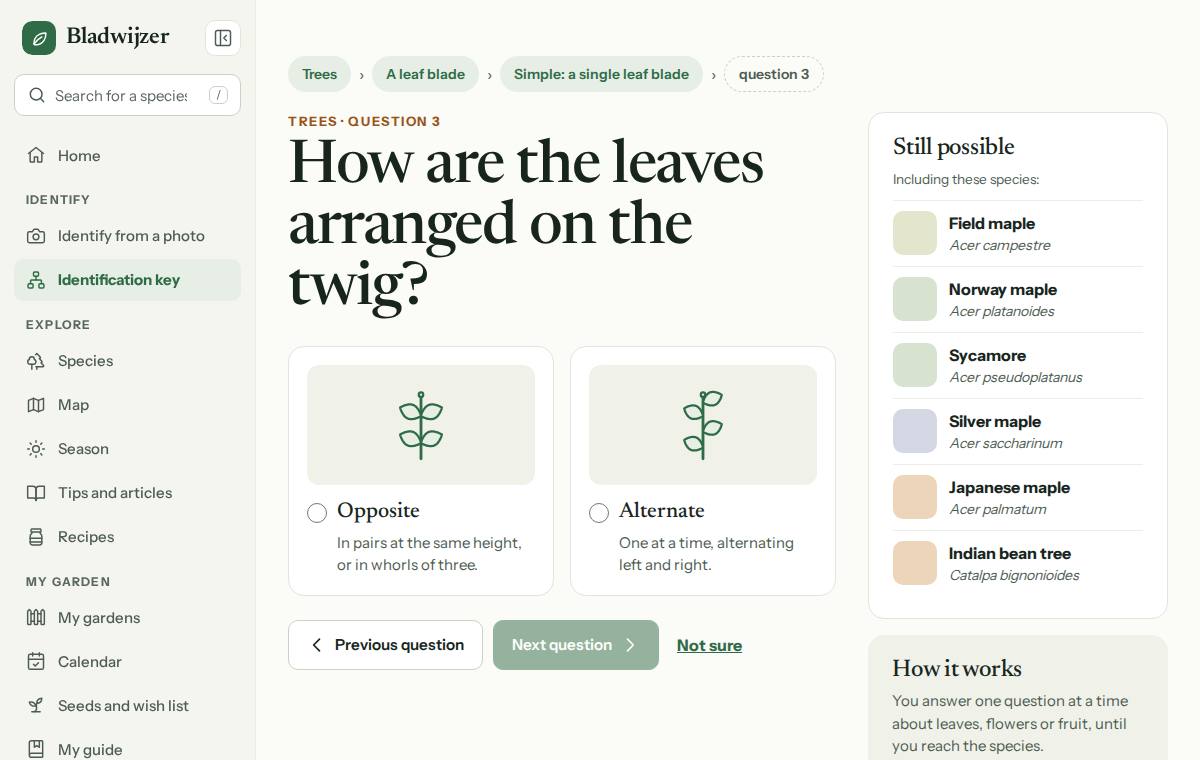
The identification key asks you a few questions about what you can see. With each choice you get closer to the species.
Two keys
- Trees: broadleaved trees, conifers and fruit trees.
- Shrubs, hedges and climbers: hedging plants, soft-fruit bushes, ornamental shrubs, climbers and dwarf shrubs.
Together they lead to more than a hundred common species found in Belgium and the Netherlands.
How it works
- Choose a key under Key.
- Answer the question: tap the card that fits (every choice has a drawing) and choose Next question.
- Not sure? Choose Not sure: alongside you’ll then see every species that is still possible. Previous question, or an earlier answer in the trail at the top, takes you back; Start again lets you pick a key.
- At the end you’ll see the species, with the features to check and the species that look similar, with Difference from …: the comparison page of both species.
Tip
The keys use leaf, flower and fruit features, so they work best from spring to autumn. In winter, buds and bark can help, but a photo is often easier.
Saving and sharing
- If you’re logged in, save the result with Save to my guide.
- Every step has its own address, so you can send someone a step along the way or carry on later.
Identify by feature
Spotted something striking, such as pinnate leaves, red berries or a white trunk? Under Identify by feature, choose what you see and you will straight away find the species it usually is. There are 34 features in five groups (leaves; needles and scales; flowers and blossom; berries and fruit; trunk, twigs and climbers), each with its own page, such as Pinnate leaves, White blossom or Red berries. On every page you’ll find:
- the answer in the first sentence: which species it usually is in Belgium and the Netherlands;
- 3 to 25 species with a photo, each with the feature that identifies it, marked Native, Poisonous or Invasive non-native: do not plant;
- a tip to look further;
- the question in the identification key where you carry on, the comparison pages between species on the list (Torn between two?) and other features.
You can also get there from the home page (Or search by what you see), from a species page (Identify by feature under the features), from a comparison page, and in the key itself: next to some questions you’ll see All species with this feature.
Good to know
An expert reviews every page before it appears in search engines. You can always open it, though.
Side by side: species that look alike
Torn between two species, such as English oak and sessile oak, or blackthorn and hawthorn? Under Side by side every pair of look-alike species has its own page, such as English oak or sessile oak?: almost 300 pairs in all. On every page you’ll find:
- the answer in the first sentence: how to recognise one and the other;
- photos of both species;
- a comparison table: leaves, flowers, fruit, bark, shape and height, growing conditions, native or not, good for bees, butterflies and birds, poisonous or not, and the pruning months;
- what the difference means for your garden: which one is native, which one is poisonous or invasive, and which one grows too big;
- links to both species pages, both pruning guides and the question in the identification key that separates them, and to other species that look alike.
Sixty pairs that people confuse most often have their own, detailed text: at a glance, the best feature in each season (also in winter, without leaves), where they grow, which one to choose for your garden, and a fun fact. For example Sweet chestnut or horse chestnut?, Beech or hornbeam? and Bay laurel or cherry laurel?. They are at the top of Side by side, with a search box for all pairs. The other pages are compiled from the species pages.
You can also get there from a species page (Difference from … under Looks like it, but isn’t), from the pruning guide (Similar to), from the result of the key (Not to be confused with) and from a page under Identify by feature. At the bottom of a comparison page, in turn, you’ll find the features both species share.
Good to know
An expert reviews every comparison page before it appears in search engines. You can always open it, though.
Updated on 2026-10-10