
Manual › Your garden
Challenges and badges
Each season a few challenges for your garden and nature, badges for what you already do in Bladwijzer, and twenty-four wildlife garden guides around No Mow May.
Under Challenges and badges (in the menu, and in your settings) you find what you can do this season for your garden and nature, and the badges you have earned.
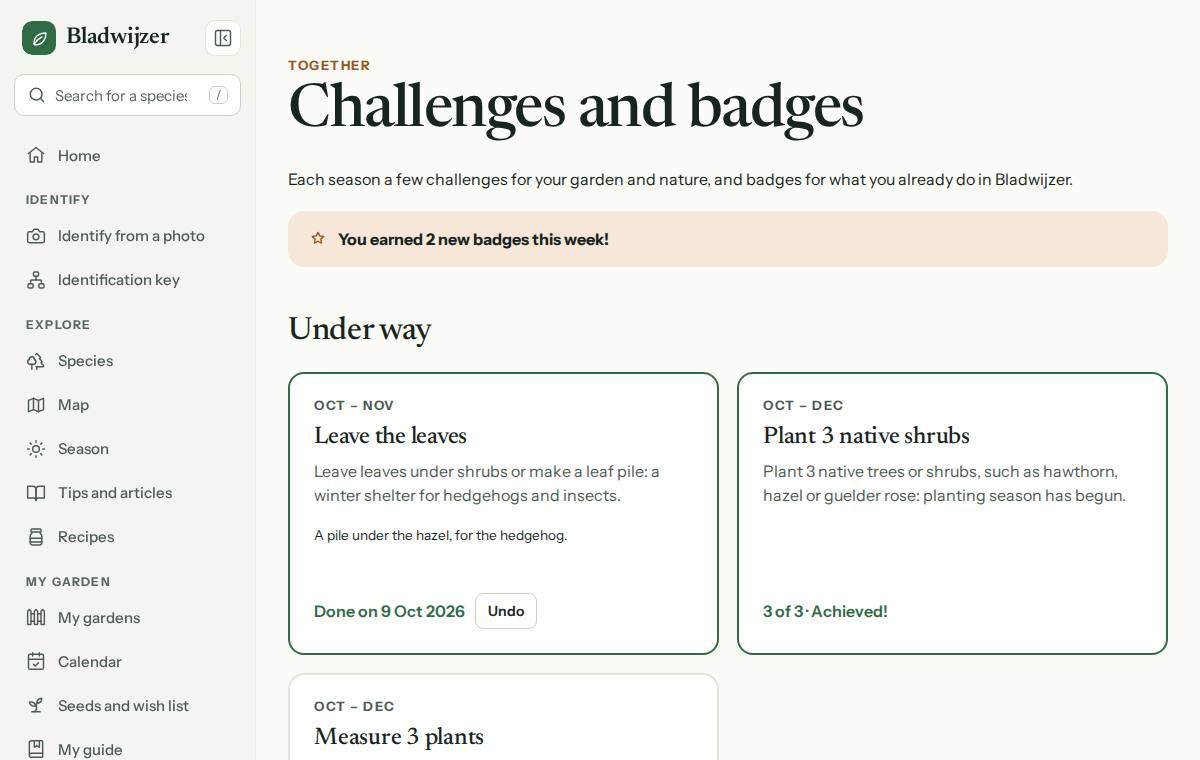
Challenges
Each season a few challenges run, every year again. At the top is what is under way, below that what comes later this year and what ran earlier this year.
| When | Challenge | How |
|---|---|---|
| January–February | Count the birds | Mark it yourself |
| February–March | Put up a nest box | Mark it yourself |
| March–May | Sow 5 vegetables | Bladwijzer counts the crops you mark as sown or planted |
| March–May | Make a bee hotel | Mark it yourself |
| May | No Mow May | Mark it yourself |
| April–September | Discover 10 species | Bladwijzer counts the species you save in your guide |
| June–August | Put out a water dish | Mark it yourself |
| July–September | Harvest 5 crops | Bladwijzer counts the crops you mark as harvested |
| October–November | Leave the leaves | Mark it yourself |
| October–December | Plant 3 native shrubs | Bladwijzer counts the native plants you put in your garden |
| October–December | Measure 3 plants | Bladwijzer counts your measurements |
- Mark it yourself: choose Done! and add a note if you like (e.g. which birds you saw). Made a mistake? Choose Undo.
- Bladwijzer counts: a bar shows how far you are (e.g. 2 of 3). What you do within the challenge’s months counts. Once you reach the goal, the challenge stays achieved, even if you delete something later.
Badges
You earn badges with what you already do in Bladwijzer: species in your guide, plants in your gardens, harvests, watering, solving problems, measuring growth, work days and activities, meeting up via the noticeboard, ideas in the suggestion box, recipes and completed challenges. Each badge shows how to earn it and how far you are (e.g. 12 of 50).
A badge you earned stays, with its date. During the first week it is marked Just earned. The number of badges also appears in your figures on your account.
Good to know
Challenges and badges are only for you: others don’t see them.
Sharing
You identify a new species, your guide reaches 10, 25 or 50 species, or you earn a badge: something to be proud of. Now and then Bladwijzer then asks at the bottom of the screen whether you’d like to share it: a way to show that you’re making time for nature, and how well you’re doing. With Share you choose where it goes (Instagram, WhatsApp, Facebook …), with an image of your find and a link to the species page. The image shows no places or photos.
Bladwijzer asks at most once a week, and less often if you don’t share. Don’t want it any more? Tap Don’t ask again, or turn it off under Account › Privacy. You can always share your garden year with the button on that page.
Wildlife garden
Under Wildlife garden (in the menu under Explore) you’ll find twenty-four guides to make your garden richer in wildlife, around No Mow May (Maai Mei Niet): what it is, how to take part, what it brings and what to do after May. The guides are in four groups: plants for bees, butterflies and birds; shelter and nest sites; water and soil; and wildlife-friendly upkeep. For example a hedgehog-friendly garden, a native hedge, a wildlife pond or leaving the leaves. Every guide has:
- the answer at the top: what to do, in one sentence;
- What to do: the steps, and Why it helps;
- Which plants?: the plants that go with it, linked to their pages, native ones first and never an invasive non-native;
- When?: the months, linked to the garden jobs for that month;
- the challenge that goes with it, articles and related guides.
The guides that are in season now come first on the wildlife garden page; they also appear under the garden jobs for each month. The wildlife garden is public: you don’t need to log in.
For most challenges, Read the guide takes you to the guide that goes with it, for example the nest box guide for Put up a nest box.
Good to know
An expert reviews every guide before it appears in search engines. You can always open it, though.
Updated on 2026-10-15